[Release] Pcsx2 with depth buffer access
- MrCassidy
Less
More
7 years 2 months ago #21
by MrCassidy
Replied by MrCassidy on topic [Release] Pcsx2 with depth buffer access
Great job on the debugging! The OpenGL plugin is now detecting the screen space more accurately than before.  However I'm still unable to aline the depth buffer accurately to the screen space of KH 2. I've tried using EMU modes1-3. No success... Is there something else I should try?
I'll provide visuals for all 3 modes.


Let me know if you know if you have an idea on what's going on. Also let me know what I can do to help as well.
However I'm still unable to aline the depth buffer accurately to the screen space of KH 2. I've tried using EMU modes1-3. No success... Is there something else I should try?I'll provide visuals for all 3 modes.
Let me know if you know if you have an idea on what's going on. Also let me know what I can do to help as well.
Please Log in or Create an account to join the conversation.
- TheGordinho
Less
More
7 years 2 months ago #22
by TheGordinho
Replied by TheGordinho on topic [Release] Pcsx2 with depth buffer access
The official/unnoficiall devs of pcsx2 seem to be pretty interested on this (at least one of them)
Give them a hi on their discord server
Give them a hi on their discord server
Please Log in or Create an account to join the conversation.
- BlueSkyKnight
Less
More
7 years 2 months ago - 7 years 2 months ago #23
by BlueSkyKnight
Replied by BlueSkyKnight on topic [Release] Pcsx2 with depth buffer access
Boulotaur2024 wrote: So it was an excruciatingly painful debugging work but after switching to NVIDIA and spending hours trying to figure out why it didn't work.
I finally managed to get it working fine on NVIDIA !
abload.de/img/captureblj0g.jpg
For now I'll let people choose between NVIDIA or AMD dll but I'm pretty sure the NVIDIA one works with both cards, just in case...
I dropped entirely support for D3D11 as it was... buggy, now it's all about OpenGL (even though I hate everything about it)
Enjoy

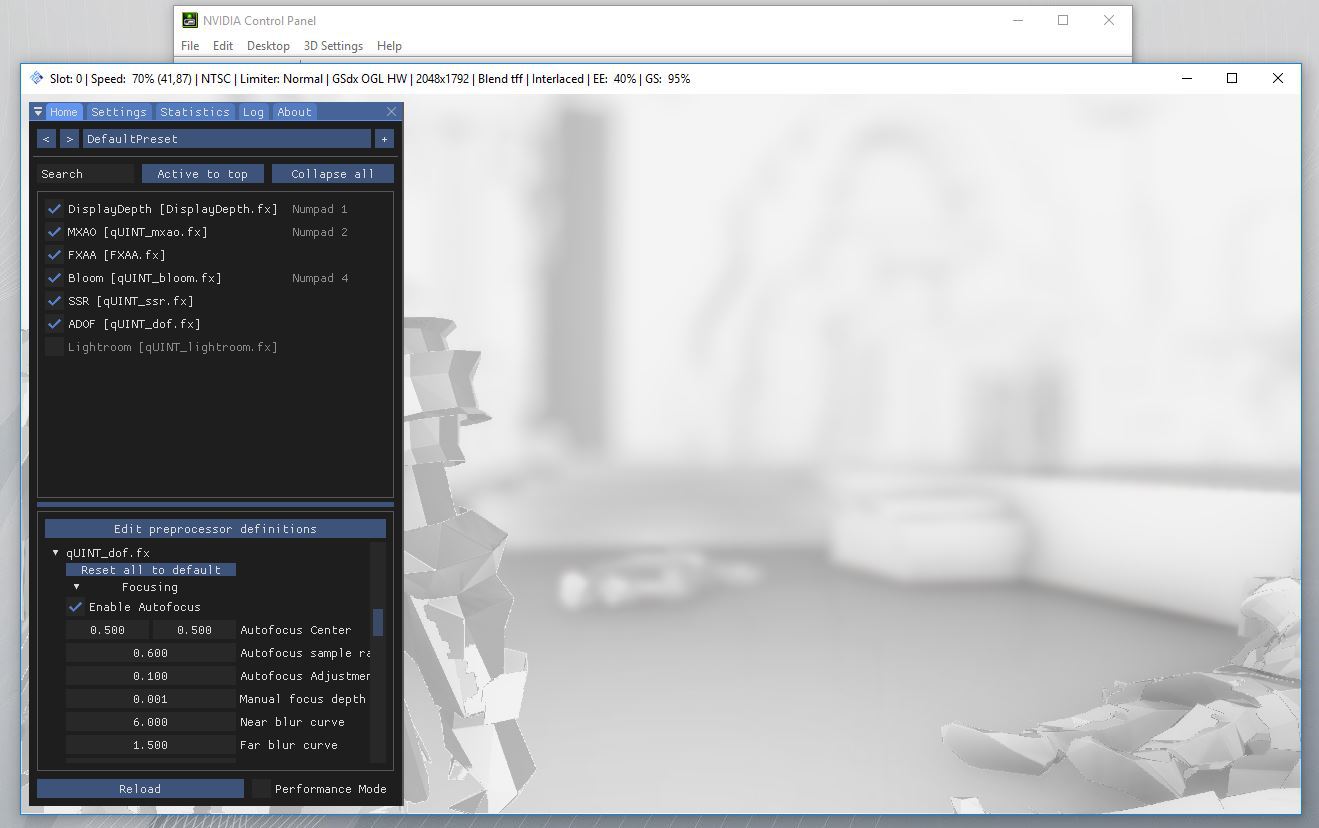
Tested the Nvidia version on my RX 580x and it didn't work.
Tested the AMD version it worked.
The game I tested was Fatal Frame USA Version. With the New OpenGL Version, you posted.
I did have one issue with the OpenGL version though. The issue happens when going from windowed mode to fullscreen. I lose the depth buffer.
This issue goes away when using the games native 4:3 AR.
Now, this issue does not happen with the older DirectX version of the DLL you posted here.
Last edit: 7 years 2 months ago by BlueSkyKnight.
Please Log in or Create an account to join the conversation.
- BlueSkyKnight
Less
More
7 years 2 months ago #24
by BlueSkyKnight
Replied by BlueSkyKnight on topic [Release] Pcsx2 with depth buffer access
TheGordinho wrote: The official/unnoficiall devs of pcsx2 seem to be pretty interested on this (at least one of them)
Give them a hi on their discord server
Ask them if they can do anything about the low bit depth in some games. Like Fatal Frame. en.wikipedia.org/wiki/Fatal_Frame

Please Log in or Create an account to join the conversation.
- Boulotaur2024
- Topic Author
Less
More
7 years 2 months ago - 7 years 2 weeks ago #25
by Boulotaur2024
Replied by Boulotaur2024 on topic [Release] Pcsx2 with depth buffer access
MrCassidy wrote: Great job on the debugging! The OpenGL plugin is now detecting the screen space more accurately than before.
It works for me on the PAL version (I guess you are using NTSC) with this config :
[EMULATORS]
EMUName=pcsx2
EMUMode=1
EMUWidth=2048
EMUHeight=1664Not related but I just found out about a big issue that I was not aware of while staying all that time in debug view

But once you blend in the SSAO with the final image, you will realize that there is always a delay between the SSAO buffer and the emu output :
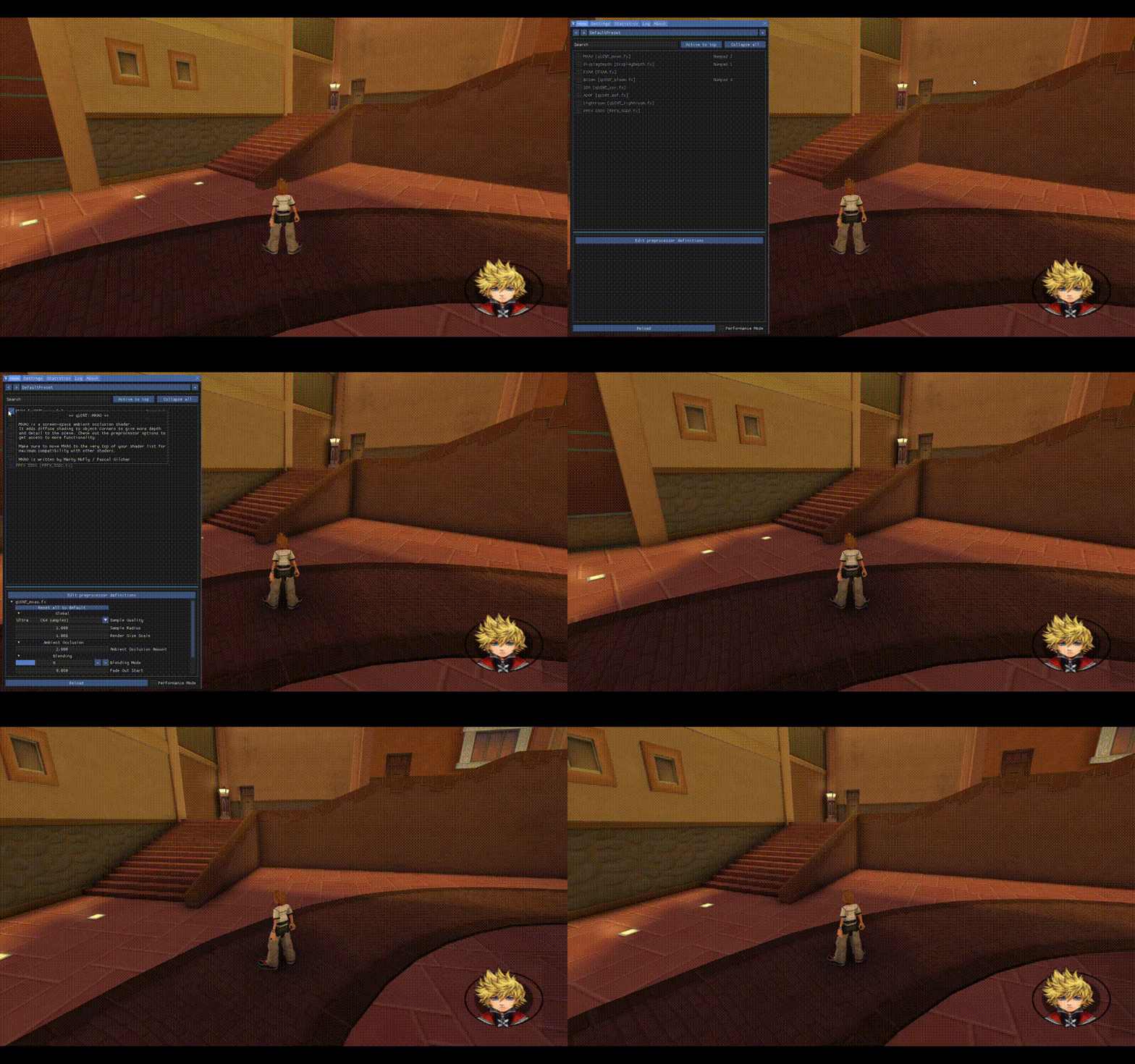
So basically when you move the camera around the SSAO is "trailing" behind (or before ?) the game output.
EDIT : actually its *ahead* of the game output. The ssao buffer visibly draws on the screen *before* the game.
Look at how the shadow/crease on the stairs slowly detach from where it should be as the camera moves on.
It does *not* show on static images, if you take screenshot on still characters, the issue won't show.
But once you start moving around the camera, you can see that the ssao buffer draws ahead of everything !
Nerrel in this forum documented the exact same issue but for GlideN64.
Well it looks like PCSX2 is affected by that too...
Any dev willing to chime in and explain the delay between the SSAO buffer and the emulator output ?
This is a big issue and I have absolutely no idea how to fix it by myself.
But if this gets fixed, the GlideN64 case is solved as well, so this is a good news too : )
EDIT : Could be related to Vsync or something.
EDIT : No I tried every possible setting in NVIDIA Control Panel... That and the Maximum Pre-Rendered Frames NVIDIA thingy
EDIT : Could it be that the emu is internally triple-buffered thus slower to output the frame when Reshade is not (triple-buffered) ?
I'm at work but I can't stop thinking about it

EDIT : turns out the solution would be to alter code in Pcsx2 in order for the emu to output the depth buffer at frame buffer 0 (main framebuffer). I doubt people over there care enough to ever make the change (and Gregory is a father now
) but if you want news about it, then this is the place to go for answers :github.com/PCSX2/pcsx2/issues/2311#issuecomment-506947109 .
Last edit: 7 years 2 weeks ago by Boulotaur2024.
Please Log in or Create an account to join the conversation.
- StuDentBR
Less
More
7 years 2 months ago - 7 years 2 months ago #26
by StuDentBR
Replied by StuDentBR on topic [Release] Pcsx2 with depth buffer access
Did you try talking to the pcsx2 devs on discord? They seemed to be willing to help...
Pcsx2 discord server :
discord.gg/zUdrM7
Pcsx2 discord server :
discord.gg/zUdrM7
Last edit: 7 years 2 months ago by StuDentBR.
Please Log in or Create an account to join the conversation.
- StuDentBR
Less
More
7 years 2 months ago #27
by StuDentBR
Replied by StuDentBR on topic [Release] Pcsx2 with depth buffer access
I am having an issue with Nvidia version using opengl, I get depth buffer only if the emulator is windowed and the window is small if go full screen or even maximize the window the depth buffer goes blank... This issue does not happen on the dx11 version that you have released earlier. I am using a 4k TV at native 4k resolution, and a gtx 1070.
Please Log in or Create an account to join the conversation.
- Boulotaur2024
- Topic Author
Less
More
7 years 2 months ago - 7 years 2 months ago #28
by Boulotaur2024
Replied by Boulotaur2024 on topic [Release] Pcsx2 with depth buffer access
[strike]Yeah, I'm sorry I cannot reproduce the issue (BlueSkyKnight has the same problem, I know)StuDentBR wrote: I am having an issue with Nvidia version using opengl, I get depth buffer only if the emulator is windowed and the window is small if go full screen or even maximize the window the depth buffer goes blank... This issue does not happen on the dx11 version that you have released earlier. I am using a 4k TV at native 4k resolution, and a gtx 1070.
You might want to zip up your pcsx2 folder (up to 50 mb if properly zipped) and send it to me. Your internal resolution could be really weird, I don't know your pcsx2 settings (or the game you try to play)[/strike]
EDIT : I think I solved the issue. I updated the OP
Do let me know if that works for you.
About the wobbling ssao effect described above, I'm slowly losing faith that I can come up with a solution... But at least I tried to document it as much I could (that gif took me forever to make lol, I lost the habit of doing that, but it does illustrate the issue well enough).
It's not related to pcsx2 because every emulator using OpenGL suffer from the same symptoms. It's a Reshade thing (imho).
[strike]Maybe because the "Copy Depth from FBO" trick that Crosire uses * runs too fast (a few frames ahead) compared to the framebuffer (?) used by emulators. I'd guess that the latter has more work to be done and thus takes more time to output frames (pure guess, I have no clue)
[/strike]
EDIT : Turns out D3D11 has the same issue, so forget about my "OpenGL is broken" theory...
I thought about Vsync and had the idea that maybe vsync needed to be forced within Resade so it could be perfectly synced so I wrote some lines of code but to no avail.
Still it would be nice to know if you guys have the same issue... Or is it a driver thing again ?
Last edit: 7 years 2 months ago by Boulotaur2024.
Please Log in or Create an account to join the conversation.
- StuDentBR
Less
More
7 years 2 months ago - 7 years 2 months ago #29
by StuDentBR
Replied by StuDentBR on topic [Release] Pcsx2 with depth buffer access
Thanks, I will test it as soon as possible and come back with the feedback.Boulotaur2024 wrote:
[strike]Yeah, I'm sorry I cannot reproduce the issue (BlueSkyKnight has the same problem, I know)StuDentBR wrote: I am having an issue with Nvidia version using opengl, I get depth buffer only if the emulator is windowed and the window is small if go full screen or even maximize the window the depth buffer goes blank... This issue does not happen on the dx11 version that you have released earlier. I am using a 4k TV at native 4k resolution, and a gtx 1070.
You might want to zip up your pcsx2 folder (up to 50 mb if properly zipped) and send it to me. Your internal resolution could be really weird, I don't know your pcsx2 settings (or the game you try to play)[/strike]
EDIT : I think I solved the issue. I updated the OP
Do let me know if that works for you.
About the wobbling ssao effect described above, I'm slowly losing faith that I can come up with a solution... But at least I tried to document it as much I could (that gif took me forever to make lol, I lost the habit of doing that, but it does illustrate the issue well enough).
It's not related to pcsx2 because every emulator using OpenGL suffer from the same symptoms. It's a Reshade thing (imho).
[strike]Maybe because the "Copy Depth from FBO" trick that Crosire uses * runs too fast (a few frames ahead) compared to the framebuffer (?) used by emulators. I'd guess that the latter has more work to be done and thus takes more time to output frames (pure guess, I have no clue)
[/strike]
EDIT : Turns out D3D11 has the same issue, so forget about my "OpenGL is broken" theory...
I thought about Vsync and had the idea that maybe vsync needed to be forced within Resade so it could be perfectly synced so I wrote some lines of code but to no avail.
Still it would be nice to know if you guys have the same issue... Or is it a driver thing again ?
Edit: The issue i had with opengl version and full screen is now fixed. Thank you.
I still need to test the woobling issue.
Last edit: 7 years 2 months ago by StuDentBR.
Please Log in or Create an account to join the conversation.
- Amarx
Less
More
6 years 11 months ago #30
by Amarx
Replied by Amarx on topic [Release] Pcsx2 with depth buffer access
Doesn't seem to be working in Capsule Monster Coliseum and Sly 3.
Please Log in or Create an account to join the conversation.
- Menoly
Less
More
5 years 2 months ago - 5 years 2 months ago #31
by Menoly
Replied by Menoly on topic [Release] Pcsx2 with depth buffer access
Hey so im trying to use this to use this with Spy vs. Spy and im getting a weird "Failed to Compile" error when i install the modified Reshade OpenGL DLL. Is there a fix for this? https://ibb.co/3FTxrth
Last edit: 5 years 2 months ago by Menoly.
Please Log in or Create an account to join the conversation.
- gysiguy
Less
More
3 years 3 weeks ago #32
by gysiguy
Replied by gysiguy on topic [Release] Pcsx2 with depth buffer access
Any chance of getting this updated to work on the current versoins of ReShade and pcsx2 in 2023? Possibly using Vulkan rather than OpenGL? Would love to enjoy some ps2 games with beautiful RTGI!!
Please Log in or Create an account to join the conversation.
- peronmls
Less
More
2 years 11 months ago #33
by peronmls
Replied by peronmls on topic [Release] Pcsx2 with depth buffer access
I cannot get this to work on anything. Use to be real simple back in the day without any hacks.
Please Log in or Create an account to join the conversation.
- Aztec2012
Less
More
1 year 9 months ago #34
by Aztec2012
Replied by Aztec2012 on topic [Release] Pcsx2 with depth buffer access
Any news? For latest versions of PCSX2?
Please Log in or Create an account to join the conversation.
- acknowledge
Less
More
1 year 8 months ago #35
by acknowledge
Replied by acknowledge on topic [Release] Pcsx2 with depth buffer access
I test with latest pcsx2 and reshade a few days ago, and several 3D games have depth access working with some tweaks. The main one should be "RESHADE_DEPTH_LINEARIZATION_FAR_PLANE" set to be 100 , 000
Please Log in or Create an account to join the conversation.
- Soul_Reaver 73
Less
More
4 months 5 days ago #36
by Soul_Reaver 73
Replied by Soul_Reaver 73 on topic [Release] Pcsx2 with depth buffer access
This post is more or less dead but it's the only one I can find regarding this issue of pcsx2 depth buffer access for using reshade shadders that need the depth buffer.
I've been strugling with this issue for a long time.
I'm not an expert in the matter so I don't know how to solve shadders that are not working inside pcsx2.
But in order to help someone who might want to find a solution and might provide it, here's what I have found with some testing.
At this point reshade (version 6.7.3) can show the depth buffer correctly in the preview on many games.
Setup and procedure is the same as any other game.
The intensity of the depth buffer might be changed if needded using reshade config:
"RESHADE_DEPTH_LINEARIZATION_FAR_PLANE" set to be 100 , 000
I think not all games need this high value, might be less depending on the game.
I've had a constant problem with depth alignement but i think that's because my monitor is 21:9.
If i use pcsx2 in window mode and use the "Fit to window" option in pcsx2 the depth buffer is automatically aligned (At least with my monitor).
Problem was, or is... that despite the depth buffer is there and correctly identified in "Display Depth" preview the reshade shadders just work but in the wrong way, only if I change the state of "RESHADE_DEPTH_INPUT_IS_REVERSED" making MXAO type effects showing everything very dark.
And that's not the way it is supposed to work.
Something is wrong in the way reshade sees the depth buffer.
Or in the way the shadders expect to interpret the depth buffer info.
I don't know, I'm not an expert.
I came up with this conclusion because the modified qUINT shaders that where available/provided for the original solution on this post work correctly.
Something was changed in code that makes them work.
With the only nuance that some games need that "qUINT_common.fxh" to be edited in order to make the MXAO effect visibale.
Changing the 2 lines on the file from:
"float depth = tex2Dlod(sDepthBufferTex, float4(uv, 0, 0)).x * 1000;"
to
"float depth = tex2Dlod(sDepthBufferTex, float4(uv, 0, 0)).x * 100000;"
So it seems to me that everything is very close to work but the shadders inside reshade don't see the depth info when depth is correctly identified only see something when depth is in the opposite way.
Resuming:
Reshade works correctly in current version if using this quint modified shadders but not with the ones that come with reshade standard (not only quint but with none of them).
It should have a simple fix! But only the people who knows about can do it.
To me it should be done inside reshade and not changing all the shadders code just for Pcsx2.
Probably change should be donne on Generic Depth Addon.
But like I said I'm not an expert! So don't know if there's an easy fix.
But solution seems close... Very close...
And a big thanks to these people who make this amazing tools available for everyone.
I've been strugling with this issue for a long time.
I'm not an expert in the matter so I don't know how to solve shadders that are not working inside pcsx2.
But in order to help someone who might want to find a solution and might provide it, here's what I have found with some testing.
At this point reshade (version 6.7.3) can show the depth buffer correctly in the preview on many games.
Setup and procedure is the same as any other game.
The intensity of the depth buffer might be changed if needded using reshade config:
"RESHADE_DEPTH_LINEARIZATION_FAR_PLANE" set to be 100 , 000
I think not all games need this high value, might be less depending on the game.
I've had a constant problem with depth alignement but i think that's because my monitor is 21:9.
If i use pcsx2 in window mode and use the "Fit to window" option in pcsx2 the depth buffer is automatically aligned (At least with my monitor).
Problem was, or is... that despite the depth buffer is there and correctly identified in "Display Depth" preview the reshade shadders just work but in the wrong way, only if I change the state of "RESHADE_DEPTH_INPUT_IS_REVERSED" making MXAO type effects showing everything very dark.
And that's not the way it is supposed to work.
Something is wrong in the way reshade sees the depth buffer.
Or in the way the shadders expect to interpret the depth buffer info.
I don't know, I'm not an expert.
I came up with this conclusion because the modified qUINT shaders that where available/provided for the original solution on this post work correctly.
Something was changed in code that makes them work.
With the only nuance that some games need that "qUINT_common.fxh" to be edited in order to make the MXAO effect visibale.
Changing the 2 lines on the file from:
"float depth = tex2Dlod(sDepthBufferTex, float4(uv, 0, 0)).x * 1000;"
to
"float depth = tex2Dlod(sDepthBufferTex, float4(uv, 0, 0)).x * 100000;"
So it seems to me that everything is very close to work but the shadders inside reshade don't see the depth info when depth is correctly identified only see something when depth is in the opposite way.
Resuming:
Reshade works correctly in current version if using this quint modified shadders but not with the ones that come with reshade standard (not only quint but with none of them).
It should have a simple fix! But only the people who knows about can do it.
To me it should be done inside reshade and not changing all the shadders code just for Pcsx2.
Probably change should be donne on Generic Depth Addon.
But like I said I'm not an expert! So don't know if there's an easy fix.
But solution seems close... Very close...
And a big thanks to these people who make this amazing tools available for everyone.
The following user(s) said Thank You: acknowledge
Please Log in or Create an account to join the conversation.
- Soul_Reaver 73
Less
More
2 months 3 weeks ago #37
by Soul_Reaver 73
Replied by Soul_Reaver 73 on topic [Release] Pcsx2 with depth buffer access
This post is more or less dead but it's the only one I can find regarding this issue of pcsx2 depth buffer access for using reshade shaders that need the depth buffer.
I've been struggling with this issue for a long time.
I'm not an expert in the matter so I don't know how to solve shaders that are not working inside pcsx2.
But in order to help someone who might want to find a solution and might provide it, here's what I have found with some testing.
At this point reshade (version 6.7.3) can show the depth buffer correctly in the preview on many games.
Setup and procedure is the same as any other game.
The intensity of the depth buffer might be changed if needed using reshade config:
"RESHADE_DEPTH_LINEARIZATION_FAR_PLANE" set to be 100 , 000
I think not all games need this high value, might be less depending on the game.
I've had a constant problem with depth alignment but i think that's because my monitor is 21:9.
If i use pcsx2 in window mode and use the "Fit to window" option in pcsx2 the depth buffer is automatically aligned (At least with my monitor).
Problem was, or is... that despite the depth buffer is there and correctly identified in "Display Depth" preview the reshade shaders just work but in the wrong way, only if I change the state of "RESHADE_DEPTH_INPUT_IS_REVERSED" making MXAO type effects showing everything very dark.
And that's not the way it is supposed to work.
Something is wrong in the way reshade sees the depth buffer.
Or in the way the shaders expect to interpret the depth buffer info.
I don't know, I'm not an expert.
I came up with this conclusion because the modified qUINT shaders that where available/provided for the original solution on this post work correctly.
Something was changed in code that makes them work.
With the only nuance that some games need that "qUINT_common.fxh" to be edited in order to make the MXAO effect visible.
Changing the 2 lines on the file from:
"float depth = tex2Dlod(sDepthBufferTex, float4(uv, 0, 0)).x * 1000;"
to
"float depth = tex2Dlod(sDepthBufferTex, float4(uv, 0, 0)).x * 100000;"
So it seems to me that everything is very close to work but the shaders inside reshade don't see the depth info when depth is correctly identified only see something when depth is in the opposite way.
Resuming:
Reshade works correctly in current version if using this quint modified shaders but not with the ones that come with reshade standard (not only quint but with none of them).
It should have a simple fix! But only the people who knows about can do it.
To me it should be done inside reshade and not changing all the shaders code just for Pcsx2.
Probably change should be done on Generic Depth Addon.
But like I said I'm not an expert! So don't know if there's an easy fix.
But solution seems close... Very close...
And a big thanks to these people who make this amazing tools available for everyone.
Just some update on this topic:
1- I used info that was posted from some users and did not thank them.
Thank you to all that contribute to this.
2- Some games present a depth buffer that is unusable (At least I was not able to use it)
3- Some games present a depth buffer that flickers all the time (Can be used but does not work properly)
4- Some games present a delay on the MXAO effect that it's really noticeable.
There's some info on other internet sites.
I can confirm that it is an issue. More noticeable on some games.
5- What I said about where the solution should be implemented.
Thinking more about it. If Reshade is a standard solution that works on almost any game in multiple backends (dx, opengl, vulkan).
Then the problem should be solved on PCSX2. Making PCSX2 present the depth buffer info in a more "standard" way like any other game should solve the issue. This would be nice also on Dolphin.
The other option is Generic depth could also be changed with specific options for PCSX2 and Dolphin but not the ideal solution in my opinion.
Please Log in or Create an account to join the conversation.